
Git Settings
To change aspects of how Kaleidoscope interacts with Git, go to Kaleidoscope > Settings… > Git.
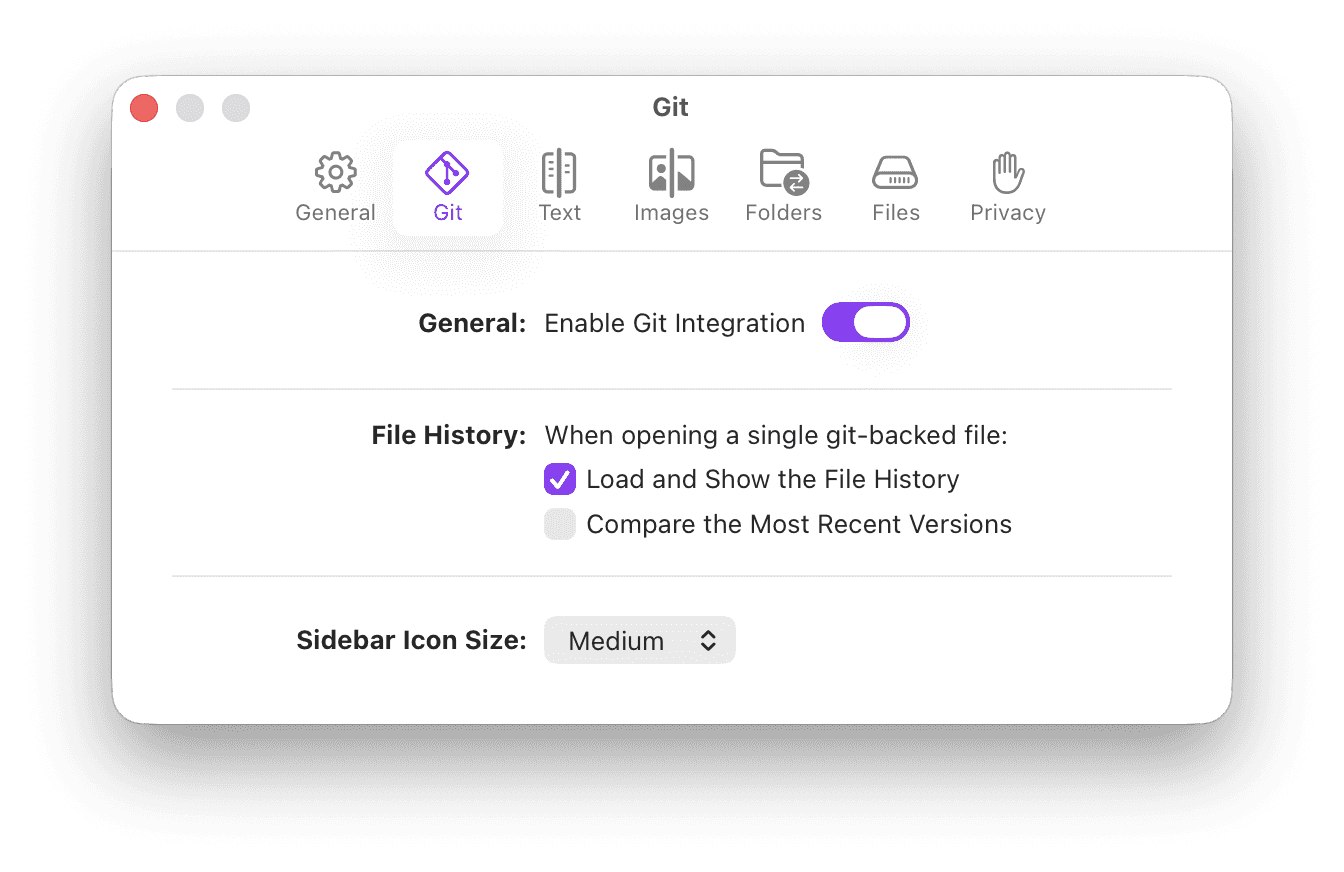
Enable Git Integration
By default, Kaleidoscope will use Git to enable powerful features related to Git Repositories, like showing the history of files, showing context around a merge, or the the ability to compare Git branches within Kaleidoscope. Use this toggle to disable Git integration entirely if needed. Note that changing this setting will only apply after restarting Kaleidoscope.
File History
When opening a file that is part of a Git repository, Kaleidoscope can automatically load and show the Git history of that file in a sidebar. Use Load and Show Git History to toggle this behavior.
In addition, when opening a single file from your working directory, Kaleidoscope can automatically compare that working copy version to the most recent commit of that file. Use Compare the Most Recent Versions to toggle this behavior.
Sidebar Icon Size
When showing a Git Changeset, Kaleidoscope will show all files modified in that changeset in a sidebar on the left. Use this setting to change the font and icon size of those entries.
The setting System means Kaleidoscope will follow whatever you have set in System Settings > Appearance > Sidebar icon size.


